

Version 1.0.0-alpha.1latest
Chapter 1.3
Your organisation, its people, and what stays private
How Nexus models an organisation and the roles its people hold, who may buy and claim on the Adverant account, and the line between what administrators can see and what stays private to each person.
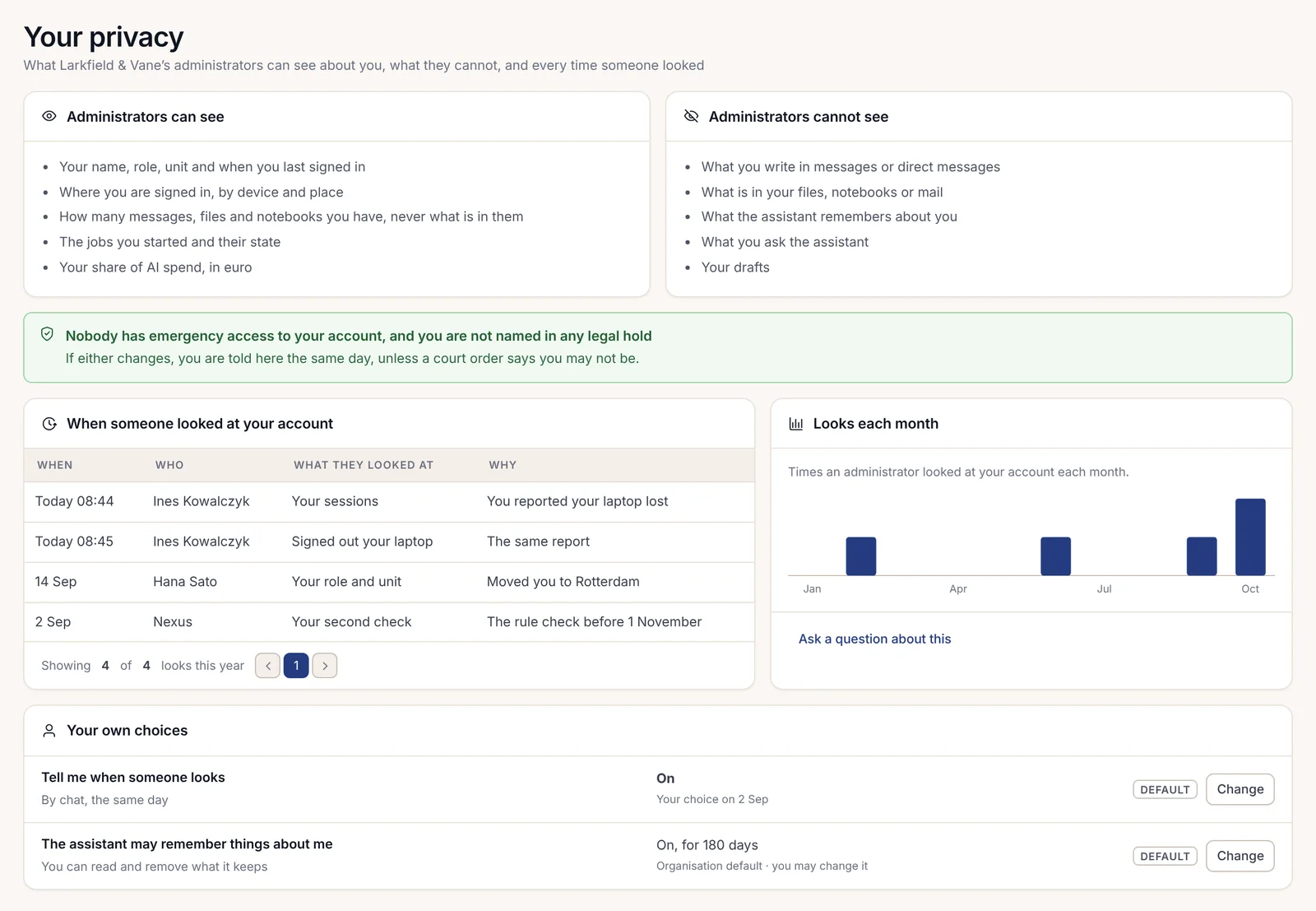
Aoife Brennan is head of IT at Harrow Port Authority and one of its two owners in Nexus. When Harrow first talked to Adverant, the question from the staff side wasn't about features at all. It was simpler: will IT be able to read our messages? Aoife opened her own privacy page in Nexus and turned the screen round so they could read it. Two columns. What administrators can see, and what they cannot.
That page is a good place to start this chapter, because it sets the tone for everything else in it. Nexus gives administrators real control over who may do what. It gives them almost no view of what people actually write.
Organisations and business units
Everything in Nexus belongs to an organisation. Its people and their files live inside it, along with its workflows and model keys, and nothing crosses to another organisation unless someone sets up a connection on purpose. Community holds one organisation per installation. Enterprise can hold several, and a person who belongs to more than one switches between them from the top of the menu.
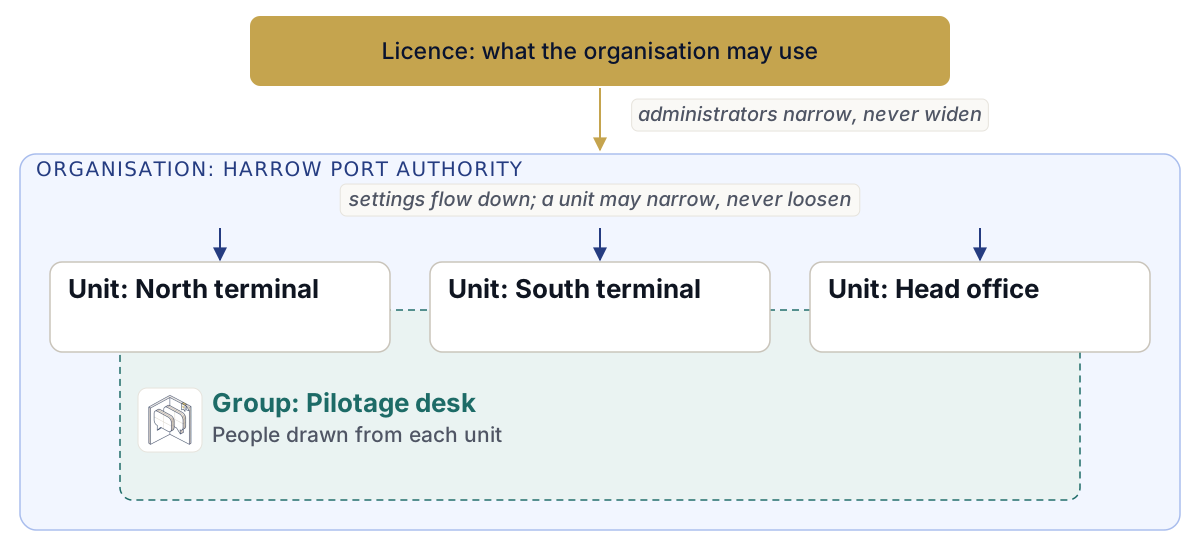
Inside an organisation, Enterprise adds business units. A unit can be a terminal or a region. It can also be a function such as finance. Harrow has a unit for each of its two terminals and one for head office. Units matter because settings flow down through them. The organisation sets a value; a unit can narrow it for its own people but can never make it looser. A setting the organisation has locked shows who locked it, right beside the value, so nobody has to guess why they can't change it.
The same rule holds one level up. Your licence says what the organisation may use, and an administrator can narrow that, never widen it.
Groups cut across units. A group such as "Pilotage desk" might take people from both terminals and head office, and it can come from the company directory or be made by hand in Nexus. Groups are used wherever a list of people is needed: in settings and sharing rules, and in deciding who approves what.
The six roles
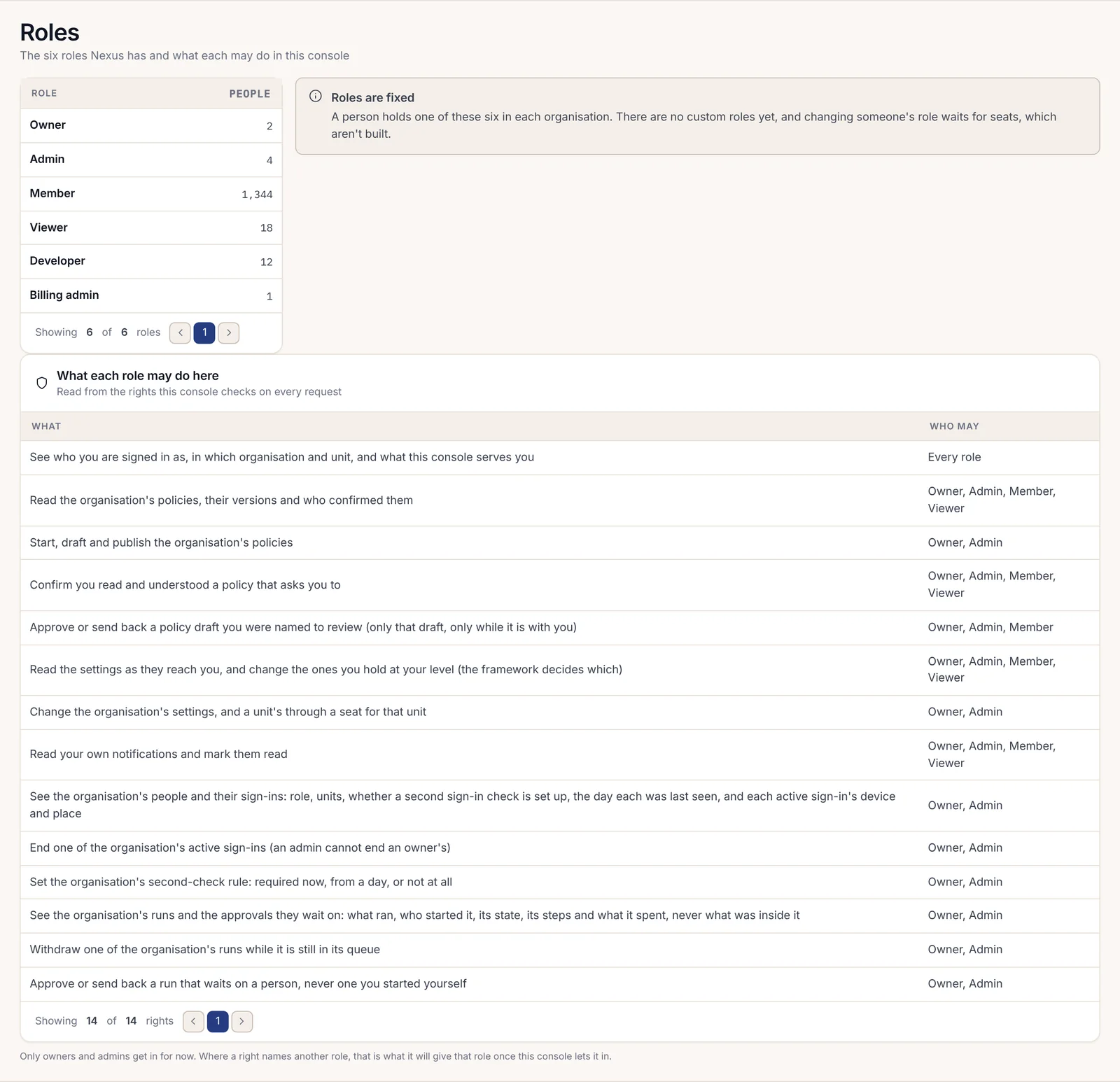
Every person in an organisation holds one of six roles: Owner, Admin, Member, Viewer, Developer or Billing admin. Most people at Harrow are members, who do their daily work in Nexus. Viewers can read what reaches them and change nothing. Developers build on the platform. Owners and admins run the organisation: they see its people and sign-ins, set the rules for second checks and change its settings. They also see the runs and the approvals those runs wait on.
An owner holds every right by being an owner, and an admin can't end an owner's sign-in. Harrow keeps two owners, which is a sensible minimum: one person on holiday shouldn't leave the organisation without anyone at the top.
The Roles page lists every right in plain words, with the roles that hold it, read from the same register the system checks on every request. So the page can't drift from what the software actually enforces. In Community the six roles are fixed. Enterprise adds custom roles, built from the same list of rights, for organisations whose job titles don't fit six boxes.
A member who wanders into an administrator's page isn't shown a blank error. They see it read-only, every row greyed with "Only administrators can change this", and the page names their administrators and how to ask them.
Rights on the Adverant account
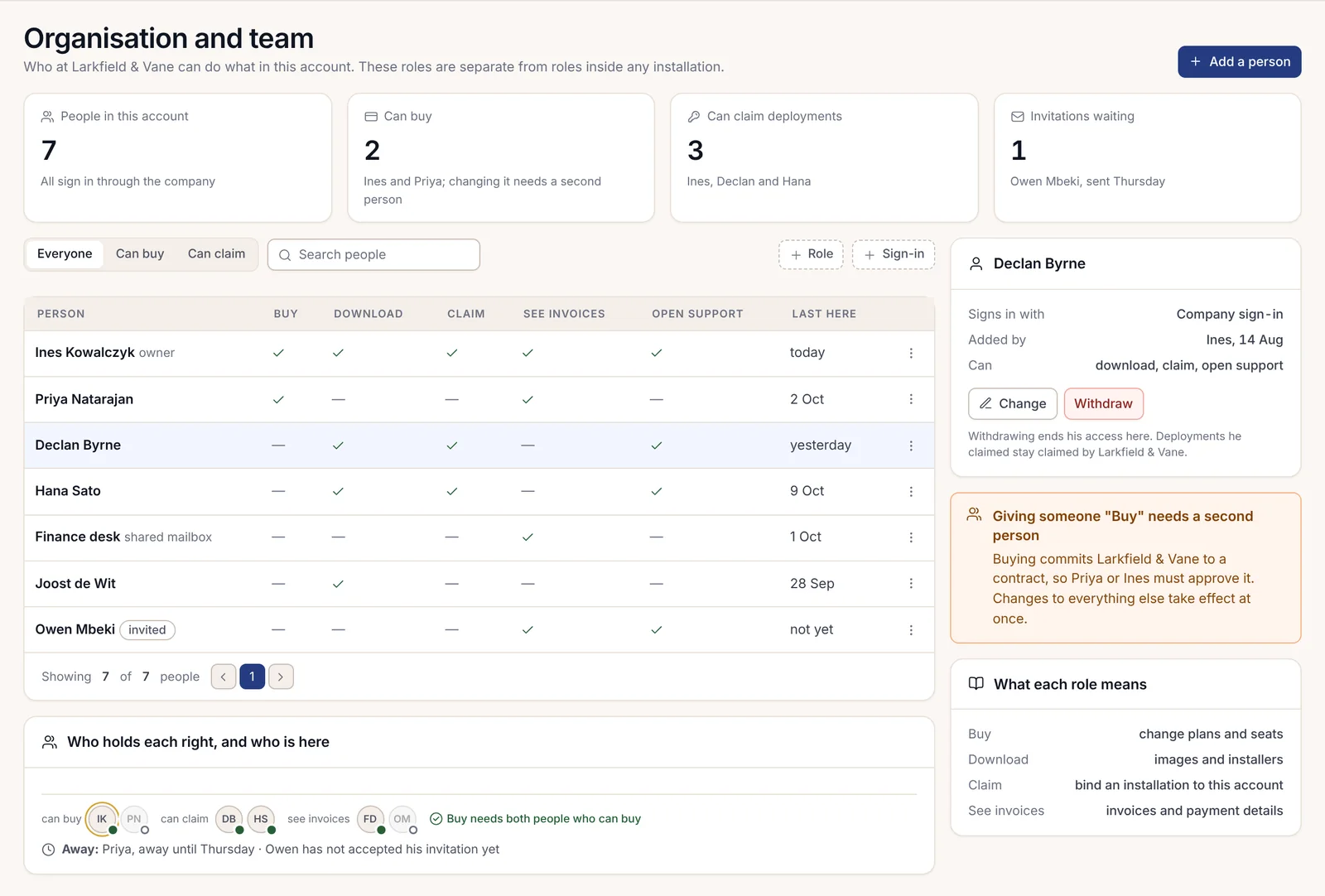
There's a second set of permissions that people sometimes mix up with roles. Harrow also has an account with Adverant. That's where licences are requested and downloaded, and where installations are claimed. Who may act on that account is decided per person, apart from anyone's role inside the installation. There are five rights:
| Right | What it allows |
|---|---|
| Buy | Change plans and seats |
| Download | Download images and installers |
| Claim | Bind an installation to this account |
| See invoices | See invoices and payment details |
| Open support | Open and follow support cases |
Four of them take effect the moment they're given. Buy is different. Buying commits the organisation to a contract, so giving someone the right to buy waits for a second person who already holds it, and that person can't be the one who asked or the one it's for. Withdrawing a person ends their rights on the account, but any installation they claimed stays claimed by the organisation.
Signing in, and second checks
People sign in with a passkey or through their company's own sign-in service, and Google and GitHub accounts work too. Community connects one company sign-in. Enterprise can require it for everyone and keep the people list in step with the company directory, so someone who leaves loses access at the next sync while their work stays with their unit. An administrator must test company sign-in with their own account before it can be required, and an emergency administrator sign-in stays available for the day it goes down. Every use of that emergency sign-in is recorded.
A second check is the extra step after the first: a passkey, or a six-digit code from an authenticator app, with backup codes shown once when it's set up. Owners and admins can require a second check for everyone from today or from a chosen day. When the rule starts, sign-in asks people to set one up and gives them a week of grace; after that, skipping it is refused. The Second checks page lists who isn't ready, so nobody has to find out at the door. Administrators themselves never sign in with a password alone.
The Sessions page shows each person's sign-ins with the device and place of each. When a member reports a laptop lost, an administrator signs that one device out and leaves the phone alone. Signing everyone out at once needs a second person.
What an administrator can and cannot see
Here is the line, as it appears on every member's privacy page.
| Administrators can see | Administrators cannot see |
|---|---|
| Your name, role and unit, and when you last signed in | What you write in messages or direct messages |
| Where you are signed in, by device and place | What is in your files or notebooks |
| How many messages, files and notebooks you have | What is in your mail |
| The jobs you started and their state | What the assistant remembers about you |
| Your share of spend on artificial intelligence (AI) | What you ask the assistant, and your drafts |
The short version is names, counts and states, never content. The same principle runs through every administrator page. A run shows what ran and who started it. It shows the state and the spend too, but never what went in or came out. The notebooks directory lists each notebook by its owner and size. The memory pages show how many facts the assistant keeps about each person (at most 40), never the facts.
When an administrator genuinely needs to see what a member sees, to help with a problem, there's a way that leaves a trace. "See it as they do" opens a read-only view of the console as that person sees it. It lasts 30 minutes and needs a second check and a written reason first. The member is told, a banner runs across the top the whole time, and their private items stay hidden. For the commoner question, why can't Tomás open this, the Explain access page walks the chain step by step and names the step that blocks it.
Personal things stay private, even inside the organisation
Some things belong to a person, not to the organisation that employs them. Their mailbox and notebooks are theirs, and so are their direct messages and whatever the assistant remembers about them. Nexus keeps those private even from the organisation's own administrators.
This isn't a matter of a hidden menu item. If an administrator tries to open a colleague's mailbox, Nexus refuses with the code PRIVATE_TO_ITS_OWNER and points to the proper route for a legal case instead. Private items are encrypted under a personal key that belongs to that person, and erasing that key makes those private items unreadable everywhere, backups included.
Emergency access exists, because emergencies do. An administrator can open someone's memory in a crisis, giving a reason, but each administrator has a soft limit of 10 such uses a quarter and a hard limit of 25, past which Nexus refuses. Every use is recorded, and the person is told the next day with the reason. On their privacy page, members can see what administrators can and can't see about them, along with every time someone looked.
For Harrow's staff, the effect was what Aoife hoped for. People use the assistant for real work because they know nobody is reading over their shoulder. Chapter 1.5, Trust and compliance, covers the other side of the same coin: the record that proves who did what, for the auditor who needs it.