

Version 1.0.0-alpha.1latest
Chapter 1.11
Making it yours
The ways an organisation shapes Nexus, from a single setting to a vertical of its own. Also how to brief developers or a partner, and what the platform guarantees whatever gets built.
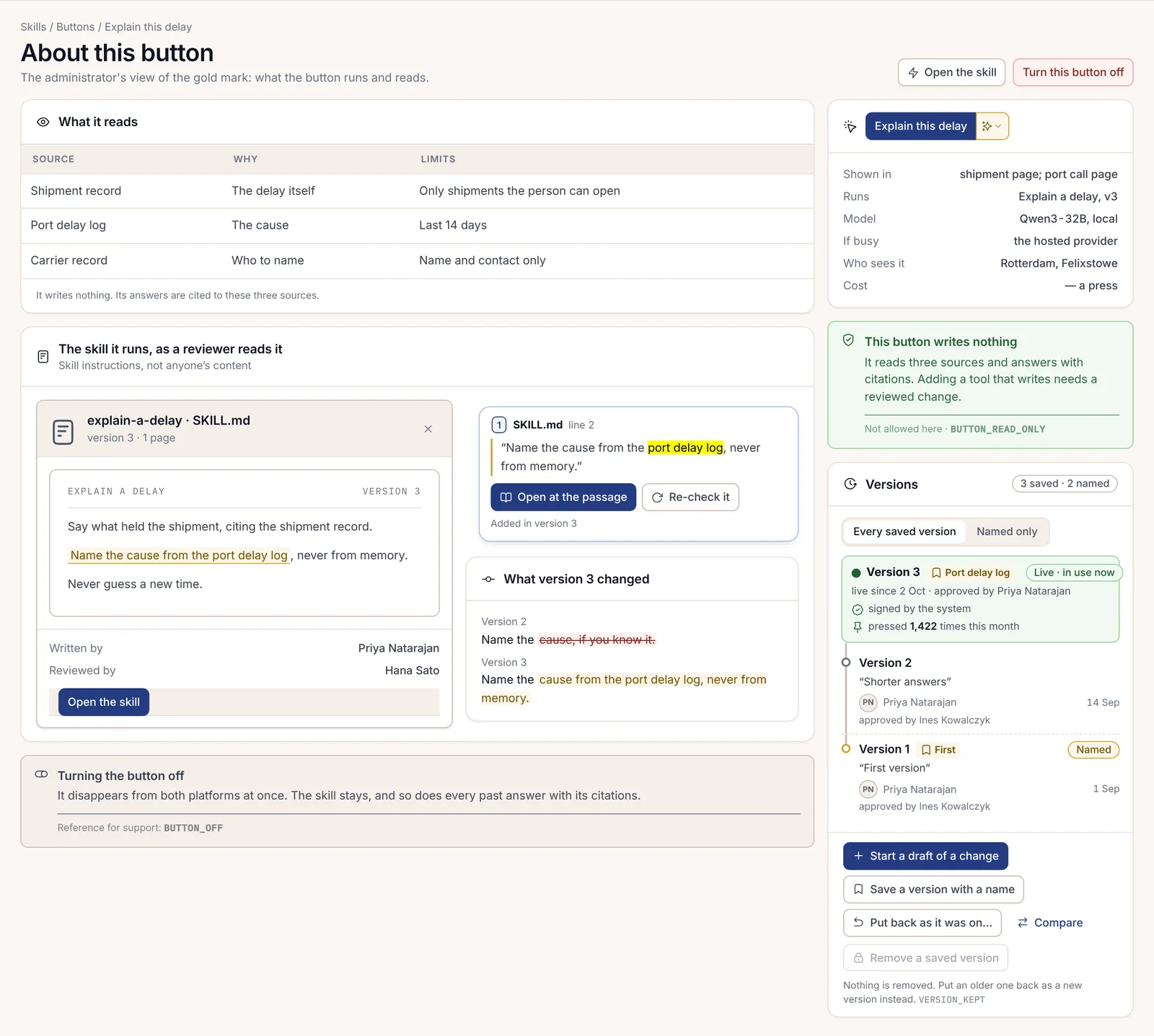
Priya Natarajan wanted to know what the "Explain this delay" button actually did before she let her team rely on it. She right-clicked it. A small panel told her which skill and version it runs, on which model. It listed the three sources the skill reads and said it writes nothing. It gave a rough cost per press, and it named who wrote each version and who reviewed it.
Every way of shaping Nexus works like that: you can see what you changed and who approved it, and you can go back. The options run from a setting an administrator changes in a minute to a vertical your developers build over several weeks. This chapter goes through them in that order.
Settings and policies
Settings live together on the Settings page. Beside its current value, each setting shows where that value came from and whether it's locked, and whether it has been handed down to a unit. Values flow from the licence to the organisation and then to units, so a unit administrator sees exactly which settings the organisation delegated to them.
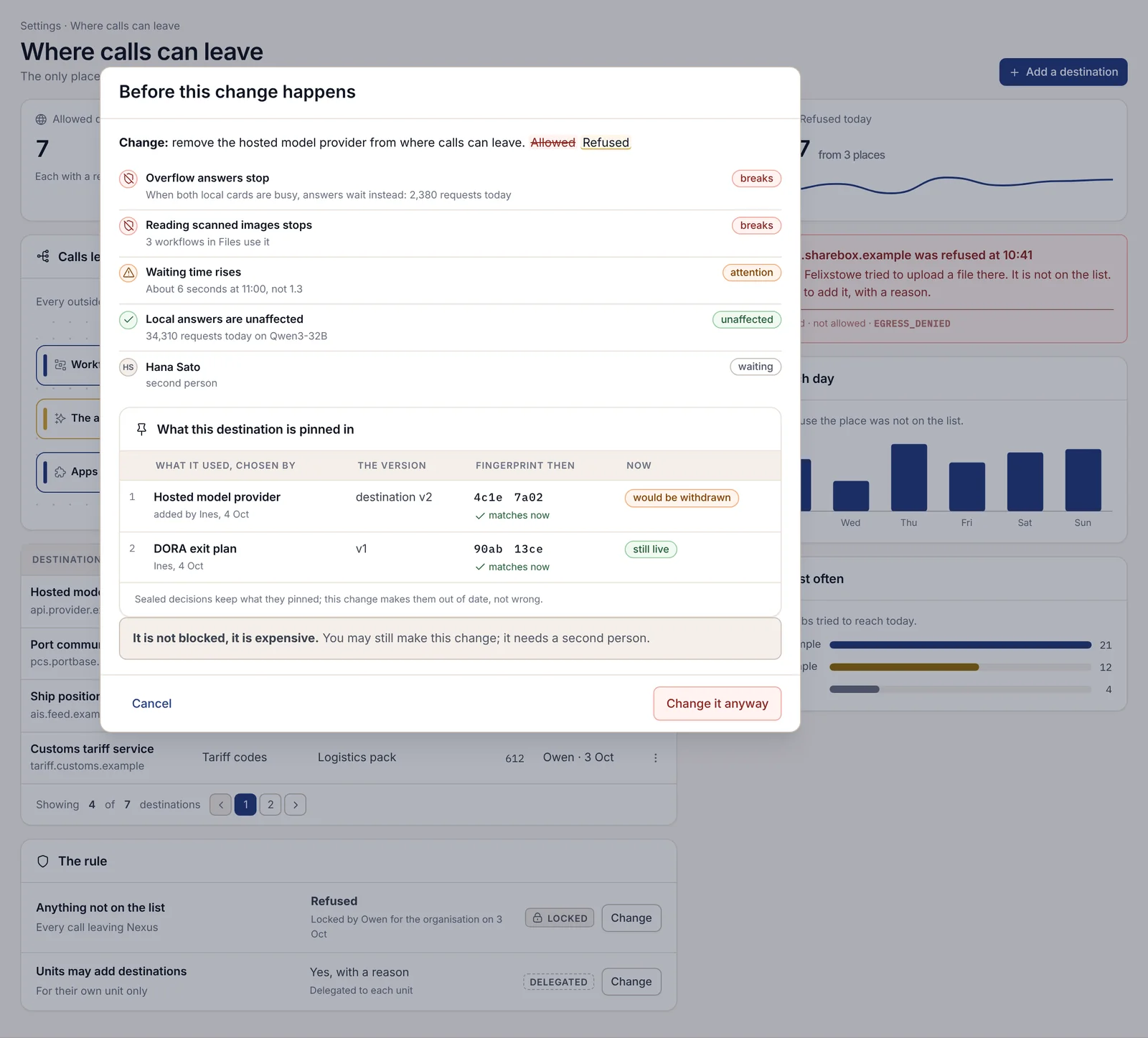
Before a risky change saves, a preview called Before this change happens shows what would break, what needs attention and what is unaffected, in today's figures. A costly change needs a second person to approve it. Every setting keeps its versions, and putting an older one back creates a new version, so the history is never rewritten.
On Enterprise, company policies get the same care. Each policy has an owner and a review date. A policy owner can redraft a clause with the assistant's suggestions marked and cited, then run the draft against last quarter's records to see what it would have changed, without changing anything. Once published, people confirm they've read the new version, and Nexus sends reminders before telling the unit administrator.
Skills: teaching the assistant a repeatable job
A skill is a repeatable job written down: the instructions, what it may read, the tools it may use and the model it prefers. Behind every artificial intelligence (AI) button in Nexus there's a skill, and every skill has an owner.
The quickest way to start a skill is to describe it in a sentence and let the engine draft it. You can also write one from scratch, import one, or combine skills you already have. Before anyone relies on it, it runs against saved test cases, then against past work in the background, and a model from a different company gives the results a blind review. Each run is sealed with the skill version and the model used.
Some limits are fixed. A skill can never use a tool the person running it doesn't have. On Enterprise, a change that lets a skill write rather than only suggest needs two named people to approve it, and the person who proposed it can't be one of them. New versions go to a small share of runs first and stop by themselves if quality drops.
There are two kinds of skill, and the difference matters when you brief developers. Skills Engine skills are the packages in the skills library, which your people create or upload and manage in the console. Manifest skills are the ones a plugin declares in its manifest; they arrive with the plugin and update when it does. Chapter 2.20, Skills, covers both.
Apps and plugins from the catalogue
The app catalogue lists ready-made apps. Before you add one, its page states what it reaches outside Nexus, what it may read and write, what it may never do, and how tightly it's sandboxed. Every app arrives switched off. Your compliance officer approves or refuses each outside address the app declares, and a call to any address it didn't declare is blocked and counted.
Withdrawing an app ends its access at once, and anything it made stays where it is. On Enterprise you can keep your own catalogue, synced from Adverant on a schedule, where new apps stay hidden until someone approves them. Third-party plugins get only the permissions they declared, and you can grant each one unit by unit, leaving some out.
A domain pack, or extending one
Chapter 1.7, Domain packs and verticals, covers switching a pack on. Extending one is the next step, and most organisations do some of it. You can add your own terms to the pack's vocabulary, add a connector to one of your systems, or add a template of your own beside the pack's.
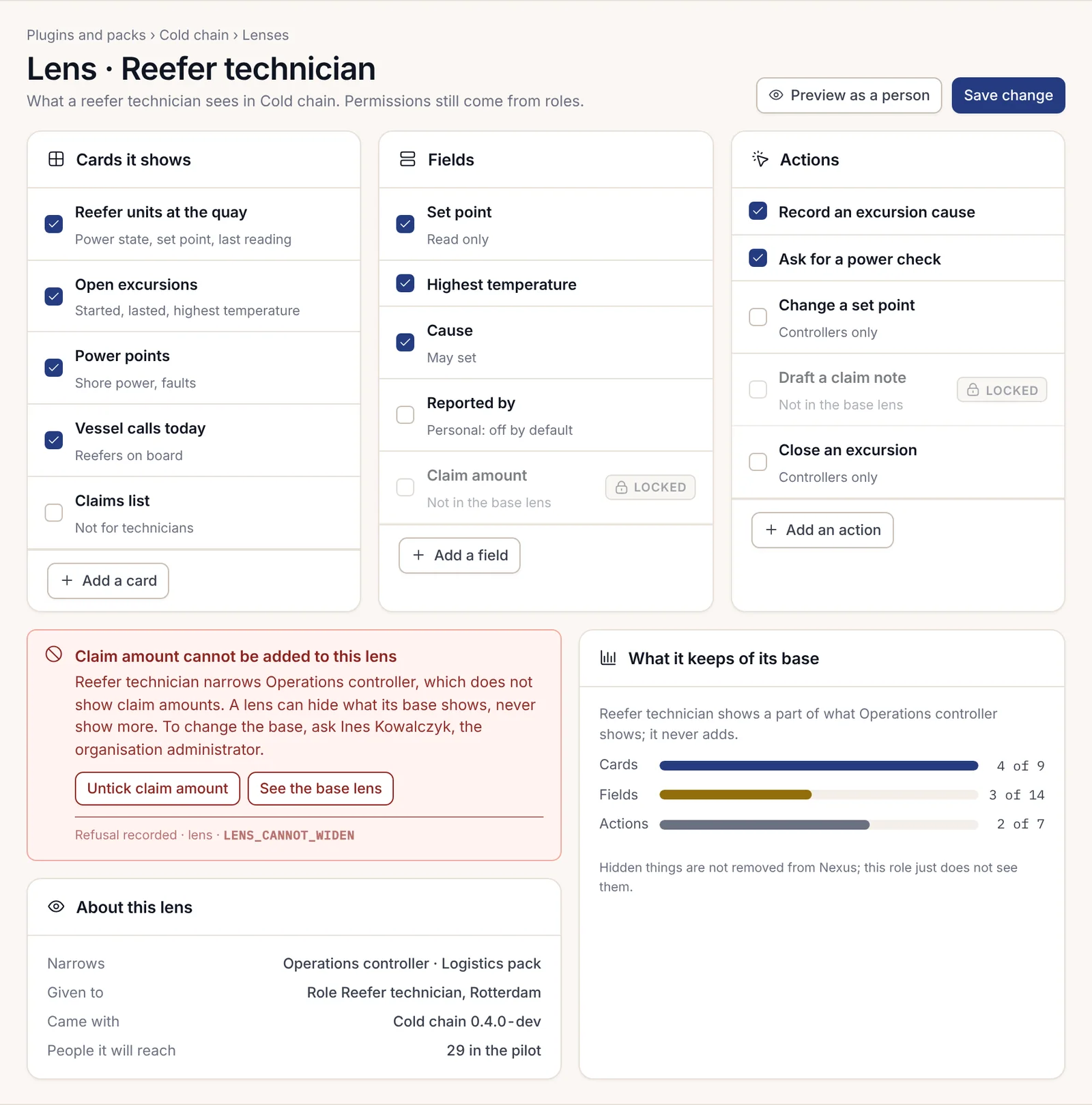
You can also build a new lens for a role the pack doesn't have, with the lens builder. You start from an existing lens and tick the cards, fields and actions the new one shows. The lens builder refuses any attempt to show more than the base lens allows, with the code LENS_CANNOT_WIDEN.
White-label
With the Storefront / white-label add-on, a platform you build on Nexus can carry your brand rather than Adverant's. Your customers pay through a checkout in your brand and get receipts in your name, and they manage their card or cancel in a customer portal you control. One customer app template can be built as several brands' own apps, which is how a broker or an insurer gives policyholders an app under its own name. If you publish your own phone app, its notifications run through your own setup and nothing about them goes to Adverant.
A vertical of your own
A platform on Nexus is the shared core plus a domain pack. If no pack fits your industry, you can build one. It has five parts: a knowledge model of the things your industry deals in, lenses for each role, a manifest that says what the pack may reach, your industry's rules mapped to the evidence that answers them, and small decision models trained on your own sealed records.
Every pack takes the same path. Its manifest is written and enforced, so a pack can't quietly do more than it said. It's previewed as each role will see it, on realistic sample data. Then a person reviews what changed before anything reaches real users, and it's released unit by unit. There are three ways to get one: use one of Adverant's ten packs, have Adverant build yours with your experts, or have your own developers build it and Adverant review the release. A pack you build stays yours. Chapter 2.24, Building a custom vertical end to end, is the technical guide.
Building with AI coding tools
Many developers now build by describing what they want to a coding assistant such as Claude Code and reviewing what it writes. Nexus is set up for that. A developer links their coding tool to Nexus through one address, and from then on the tool works inside the developer's own development space.
The platform's rules do the safekeeping, whether a person or a coding assistant wrote the code:
- The work runs on synthetic test data, or on a masked copy that the data's owner has approved. The shared live data is never written from a development space.
- The manifest says what the extension may reach. If a new version asks for more, such as sending mail or calling a new outside address, the release is blocked until two reviewers agree.
- Every release has a second reviewer, who sees the test results and the change in scope side by side. The author can't approve their own work.
- Releases move from development to a pilot unit to everyone, and no stage can be skipped. A unit can be rolled back with a reason and a second person.
An outside partner builds the same way, in a space on Adverant's cloud with sample data and no route to any customer's installation. Chapter 2.26, Building with AI coding tools, gives developers the detail.
How to brief your developers or a partner
A good brief fits on one page, and it saves weeks. Start with the work, in a paragraph your experts would recognise: what job the extension does, for whom, and what goes wrong today. Name the people who will use it by role, and say which unit tries it first. Then describe the things it deals in, in your own words, the way you'd explain them to a new starter, because that becomes the knowledge model. Say which existing systems it must read, and be explicit if it must never write to them. Finish with the decisions it touches: which ones a person must always make, which need a second person, and which rules your compliance officer will want to see answered.
Attach a short list alongside the prose:
- the roles, and for each one what they must see and must never see;
- the systems to read, with an owner for each connection;
- the outside addresses it may call, if any;
- the rules and regulations it answers to, and who confirms the mapping;
- the decisions that stay with a person, and the ones that need two people;
- the pilot unit and the date you'd like it there;
- who reviews releases on your side.
What the platform guarantees, whatever gets built
Whatever your developers or a partner build, three things hold, because they're properties of the platform rather than promises an extension makes.
Each organisation's data is kept apart. Every read and write is scoped to an organisation, to the person who owns anything personal, and to a unit where you use units. Those come from the signed-in person's own sign-in and nowhere else. An extension can't pass in a different organisation, and a request that can't say whose data it means is refused.
AI goes only through the switchboard. An extension never holds a model key. It can say which kind of model it would like, and the AI switchboard decides, using only the providers your organisation has connected and allowed.
Every action is recorded. What people and agents do is written to the audit log, refusals included. Decisions that matter are sealed, so anyone entitled can check them later.