

Version 1.0.0-alpha.1latest
Chapter 1.8
Where Nexus runs
The places Nexus can run, from Adverant's EU cloud to a site with no internet and devices in the field, what sovereignty means in practice, and how to choose.
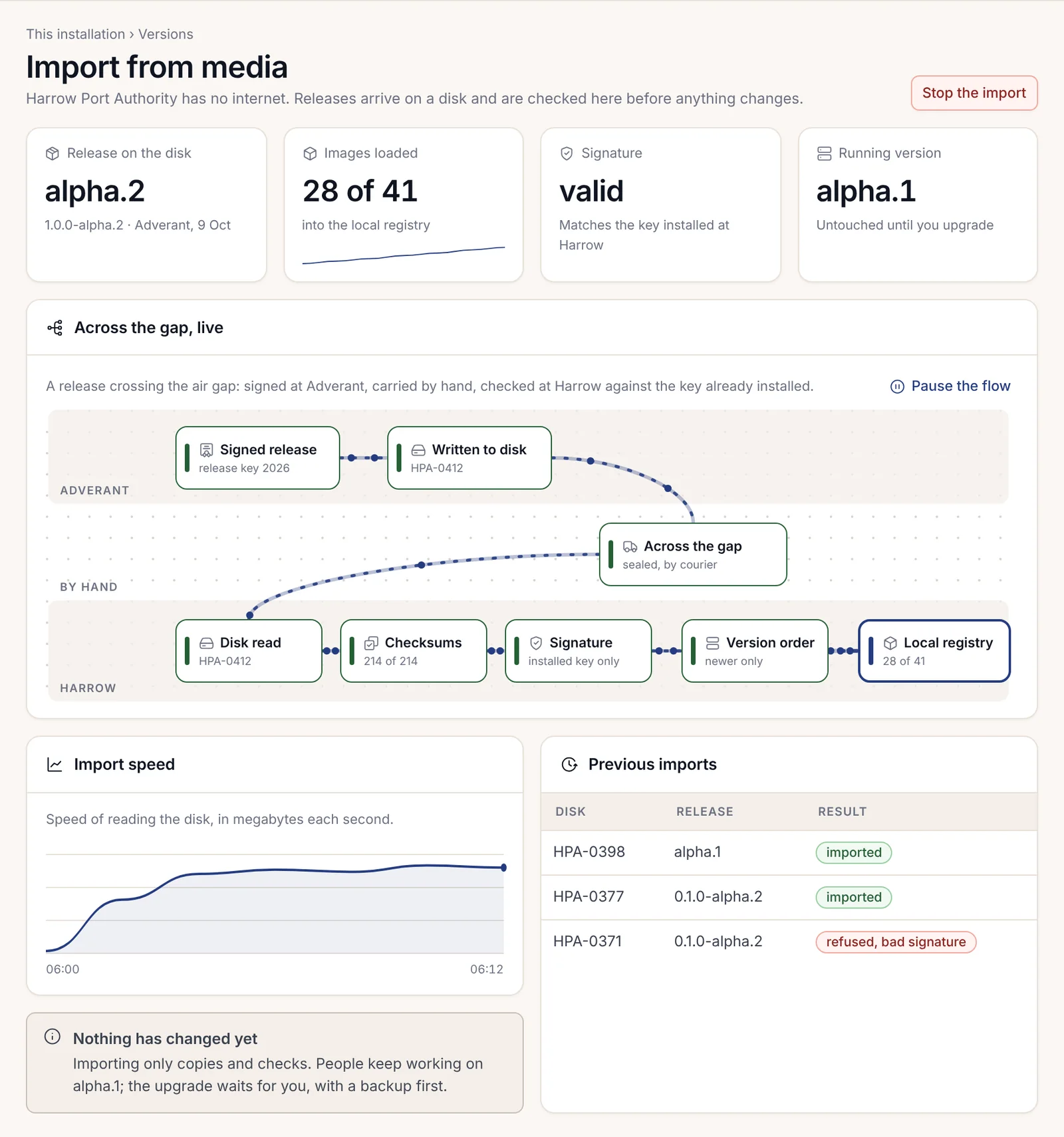
Harrow Port Authority has no internet on the network where Nexus runs. When a new release comes out, someone carries it in on a disk. Aoife Brennan, the head of IT, watches the import page check the disk's signature against the release key Harrow installed months ago, and only then does anything get copied. People keep working on the version they have. The upgrade waits until her team chooses to run it, with a backup first.
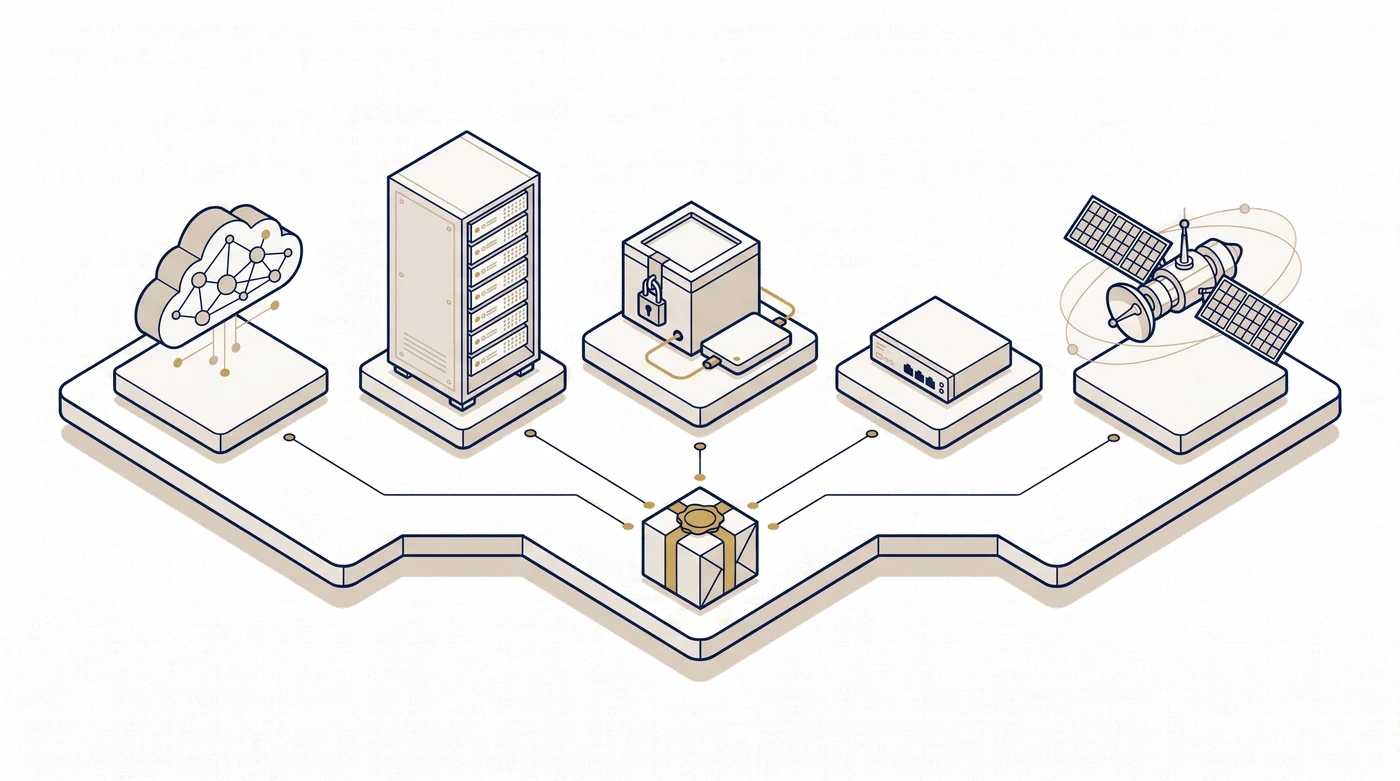
A few kilometres away, an insurer might run the same product in Adverant's cloud and never think about disks at all. It's the same software in both places. What changes is who runs the hardware and how it connects. This chapter goes through the options and what each costs you in effort, then gives a short guide to choosing.
One product, several places
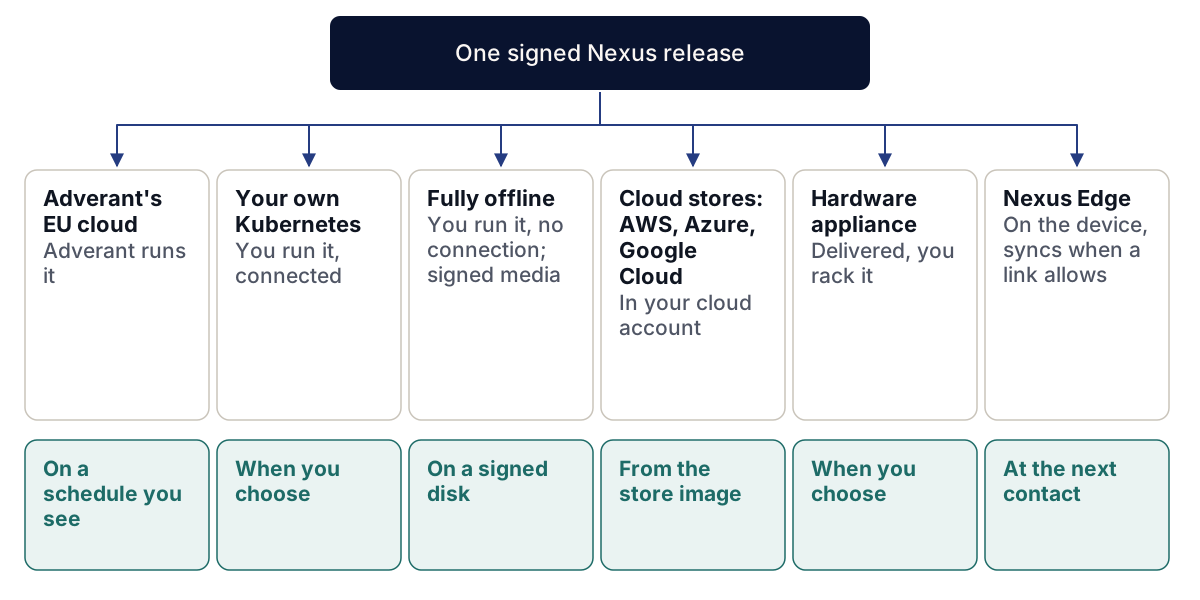
Every delivery form gets the same platform, the same domain packs and the same kind of sealed records. A screen in this documentation looks the same wherever Nexus runs. The differences are practical: who patches the servers, where the data sits, which models are in reach, and how updates arrive.
Adverant's EU cloud
Adverant runs Nexus on sovereign compute in the European Union: graphics processing units (GPUs), open models and Kubernetes, under European law. Each organisation gets its own private space with its own keys and budgets. Data is stored and processed in the EU, and an Enterprise administrator can set where each kind of data lives on the Where data lives page.
It's the quickest way to start, because nobody on your side installs anything, and Adverant applies updates on a schedule you can see. Teams that need to keep data on their own premises often begin here and move later, once the work has proved itself.
Your own Kubernetes
If you have a platform team and a Kubernetes cluster, Nexus installs there with a standard chart. Your IT team runs a preflight check first, which lists every problem with its fix before anything is installed. The install itself takes about twelve minutes on a cluster that passes.
You connect your own company sign-in, your own models on your own GPUs and your own key store. You choose when to upgrade. Upgrades are staged, take a backup first, and keep a way back with a date on it. While the installation is connected, a renewed licence can arrive by itself and wait for an administrator to accept it. Chapter 2.3, Planning an installation, is where your IT team starts.
Fully offline
For classified sites and sealed networks, Nexus runs with no connection at all. Updates and new packs arrive on signed media. The installation checks each disk's signature against the release key you installed, never against a key the disk carries, and anything that fails the check is rejected before it is opened. Nothing changes during an import: people keep working on the version they have.
Licences travel the same way. Your administrator exports a small signed request file, a person carries it out, and a signed licence file comes back. The request names only the installation and the feature, with a fingerprint. The models are the ones on your own hardware, and the artificial intelligence (AI) switchboard uses nothing else. Time stamps on sealed records are witnessed inside the site and still check out later.
The cost is effort. Someone has to fetch, carry and import each release, and nothing arrives by itself. If a licence ever had to be withdrawn from an offline site, that would be a matter for the contract, because no signal could reach it.
In your cloud account, from the store
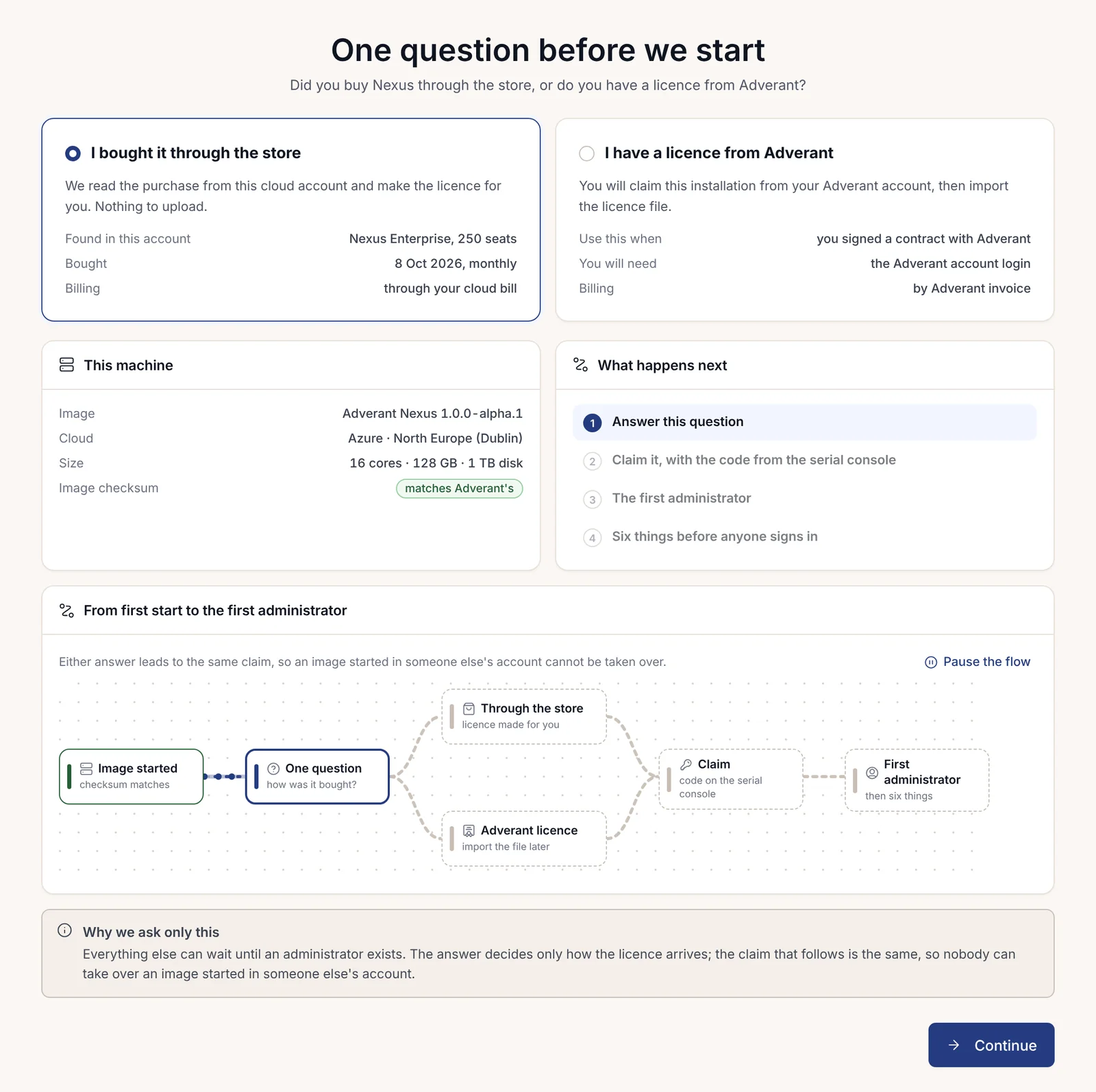
If your organisation buys through Amazon Web Services (AWS), Microsoft Azure or Google Cloud, you can buy Nexus in that cloud's store and pay through your cloud bill. The store sends you to an Adverant page where you sign in with a work account, because the subscription belongs to an organisation, never to a person. Then you start Nexus as a machine image in your own cloud account.
The first page of a new image asks one question: did you buy it through the store, or do you have a licence from Adverant? The answer decides only how the licence arrives. The claim that follows is the same either way, with a code printed on the machine's serial console, so nobody can take over an image someone else started. Nothing is billed until the licence exists, and if a store deadline lapses, the page says so plainly and nothing is lost.
A hardware appliance
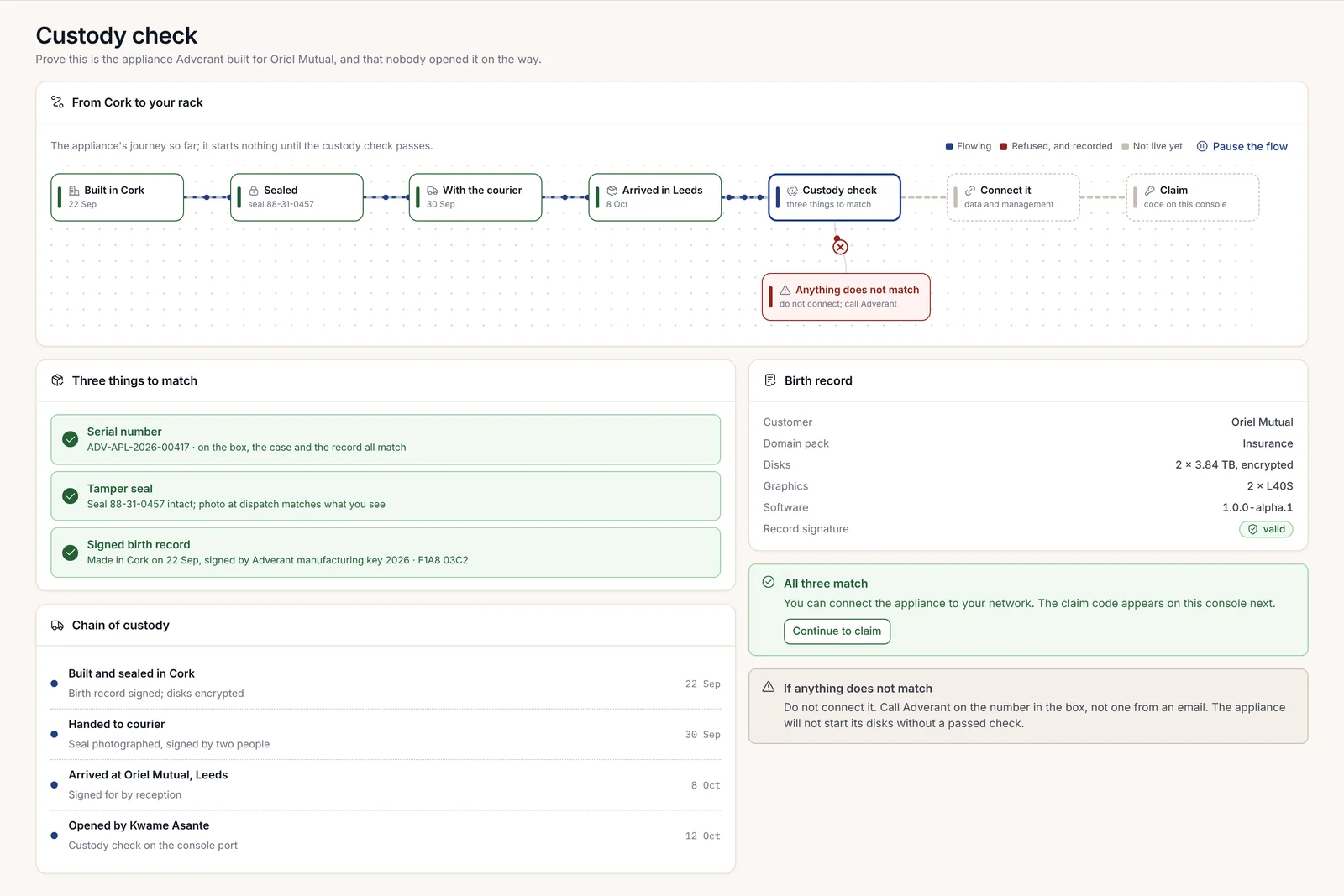
Some customers want servers delivered ready to run, with GPUs for their own models. The appliance comes from one of Adverant's hardware partners, on request; Adverant doesn't sell the box itself. When the box arrives, a laptop plugged into its console port runs a custody check, and the disks don't start until it passes. Three things must match: the serial number on the box, the case and the page; an unbroken tamper seal; and a birth record signed by Adverant.
Nexus Edge, in the field
Nexus Edge runs on the computers aboard a satellite, a drone, a vessel or a vehicle. Those computers are separate from the craft's own flight or control computer. On board, Nexus runs the knowledge graph, reads files and runs the agents for one mission, and it keeps working when the link drops. Results come home at the next contact with a ground Nexus.
Corrán Orbital, for example, flies an Earth-observation satellite whose images are read in orbit, so only what matters comes down in each contact window. Three rules keep a device in check:
- Mission packs are signed before loading. A pack holds what one mission needs (maps, models, rules). A new pack goes into a second slot, so the previous one stays ready if the new one fails its checks, and when the mission ends, or a tamper switch trips, the keys on board are wiped and a signed receipt says so.
- Limits are set on the ground. A person decides what the device may do alone, what waits for approval however long the link is down, and what it may never do. With no link, anything above the limit waits.
- The device can ask, never command. Requests to the flight computer go to that computer's own arbiter, which accepts, refuses or defers each one.
What comes down first is set too. The outbox on board sorts everything into four kinds: alerts first, then changes to the knowledge graph, then finished products, then raw data. Raw data comes down only when an analyst on the ground asks for it and gives a reason, and it travels on the next fast link.
When one of the on-board computers stops, the device drops to a lower step that keeps detection running, writes its reports from a template, holds questions until the link returns, and asks the flight computer's arbiter to restart the board. Each device's page shows those steps in advance, so the team knows what the mission will still do before anything fails.
Each device is enrolled before it leaves, and a missed contact window raises a flag for a person. Agents on a device run on a lease with an end date, so a lost device doesn't keep working for anyone. Nexus Edge is an add-on to Enterprise.
Sovereignty in plain terms
"Sovereign" gets used loosely. In Nexus it comes down to four promises, and each holds in every delivery form above.
Your data stays where you chose. At the first run, the first administrator sets where data is kept. On Enterprise you can set a place for each kind of data, and moving any of it later is a tracked job, previewed first, that a second person approves.
AI goes only to the models you configured. Every model call passes through the AI switchboard, which sends it only to a model your organisation has connected and allowed. Calls to any other outside address are refused with the code EGRESS_DENIED and counted. An organisation with no model connected gets no AI answers at all; Nexus says so and shows how to connect one, rather than quietly using someone else's.
Licences are checked offline. Adverant signs every licence with two independent keys. Your installation checks the signatures itself, without calling anyone, and a licence that fails the check is treated as absent.
Nothing phones home. On your own installations, health reporting to Adverant is off unless you turn it on. Once a year your administrator sends Adverant a usage statement of counters, which can be read in full before it leaves; an offline site carries it out on media. A support bundle goes only when you ask for help, after a preview of what it holds with the private parts removed.
Moving later
Many teams start in Adverant's EU cloud and move to their own data centre once the work is proven. Records, settings and packs move with you. Sealed records keep their seals, so an auditor can check them before and after the move. People keep their access once you connect your company sign-in on the new site.
Which is right for us
There's no wrong first answer, because you can move. Still, a few questions settle most cases.
| If this sounds like you | Start with |
|---|---|
| You want one team using it this month, and EU hosting meets your rules | Adverant's EU cloud |
| You have a platform team and your rules say data stays on your premises | Your own Kubernetes |
| The network has no internet, by policy or by design | Fully offline |
| Your organisation has committed spend with AWS, Azure or Google Cloud | The cloud store |
| You want your own GPUs without building a cluster | A hardware appliance |
| The work happens on ships, drones, satellites or field kits | Nexus Edge, with a ground Nexus in one of the other forms |
If two rows fit, pick the one your compliance officer can sign off now. Chapter 1.9, Getting started, covers what happens next, and chapter 2.3, Planning an installation, is the IT team's version of this decision.