Version 1.0.0-alpha.1latest
Chapter 1.6
Editions and licences in plain terms
The three editions of Nexus and the 19 add-ons and domain packs on top, then how a licence works for a business. It covers the offline check and what each licence state means in practice, the promises every licence keeps, and moving from Community to Enterprise without reinstalling.
Harrow Port Authority's licence arrived on an encrypted drive, carried by one of its own staff. That's how an air-gapped site works: a signed request file goes out, and a signed licence file comes back. Aoife Brennan imported it on the Licence page, and the installation checked Adverant's signatures there and then, with no call to anyone. A minute later the page listed every feature group in the licence. Beside each it showed the seats and the term.
This chapter explains what Harrow bought, what it could have bought, and what the licence does and never does once it's in place. There are no prices here. Adverant quotes them, and they depend on the way you run Nexus and what you include.
One product, three editions
Every edition of Nexus has the same screens. What a person may use is decided by a licence, never by a different build. A feature outside your licence doesn't disappear. It stays in the menu with a lock beside it. Opening it shows a plain page that says what it does and who can turn it on. There's no price on that page, and it doesn't nag. A member can send their administrator a request from it, with a reason.
Community is free and open source under the Apache-2.0 licence. It's what one person needs to finish a job in one organisation. It has the assistant with cited answers, and search over files and the knowledge graph. People keep personal notebooks and talk in basic channels and direct messages. Workflows and skills are included, along with apps from the catalogue. Administrators get members with fixed roles and one company sign-in with second checks, and an audit log kept for 30 days. Agents can watch and suggest, or ask first before they act. The organisation brings its own model keys or its own local models. Community runs on Adverant's cloud, where a free tier has usage limits, or on your own server with no licence at all.
Team runs on Adverant's cloud. It's Community plus what a team shares. The work panel docks beside every page, and notebooks and assistant contexts can be shared. Sharing a notebook sets who may read it and ask it questions, and who may change it. Administrators get a skills library that shows spend per skill and a memory and consent policy for the organisation. They also get workflow operations, such as promoting a workflow from test to live.
Enterprise is licensed per feature group and runs wherever your rules allow, including your own Kubernetes cluster and sites with no internet. It includes everything in Team. On top it adds several organisations and business units, plus enforced company sign-in with directory sync. Custom roles and four-eyes approvals come with it. The audit log is kept for years and can be streamed. Retention and legal holds are there, with the data protection and compliance pages and the pages for running your own installation. Add-ons and domain packs are licensed on top of Enterprise.
Some things are never paywalled in any edition. They form the floor. Administration and security basics are on it, and so is the separation between organisations. Signing out is on it, along with every refusal screen and the export of your data.
The add-ons
Add-ons are capabilities any kind of organisation might want, each licensed separately on top of Enterprise. An add-on you don't have shows as a single greyed row in the menu rather than a group of locked rows.
| Add-on | What it adds |
|---|---|
| AI Gateway at scale | Spreads calls to artificial intelligence (AI) models across copies and providers. It scales them automatically and adds budgets per team and a cache |
| Model factory | Trains and tunes your own models on your own graphics cards and manages their lifecycle |
| Ideas | Runs idea rounds with blind comparison and critics. It searches prior art too, and a team approves the shortlist within a budget per run |
| Calls and voice | Huddles and live calls with a transcript, and phone numbers with local voices. Recording consent follows each country's rules |
| Personal and team inboxes with rules, and checks before mail leaves. Mail can be filed into the record | |
| Other firms and walls | Shared conversations with another firm through cleaned copies, and walls between firms that must not see each other |
| Notebook studio | Makes slides and one-page sheets from a notebook, as well as audio summaries and quizzes. It also finds papers from outside |
| Map and GeoAI | Adds imagery and drone layers to the map, with models that read them |
| Data connectors | Reads outside drives and wikis, mail stores and older systems as they change. It also bridges channels to Slack and Microsoft Teams, or to Discord |
| Agent-to-agent | A registry of agents and a live map of who asks whom. Permissions are set per pair, and any request can be traced step by step |
| Decision rooms and sealed records | Rooms where a named person rules and signs with a passkey. Each ruling becomes a sealed record with a receipt and a decision passport |
| Revenue operations | Pipeline and accounts, forecast and deal desk, quotes and contracts, with territories on the map |
| Storefront / white-label | Your own brand and domain on Nexus, plus payments through the gateways you choose |
| Nexus Edge | Runs Nexus on board satellites and drones, vessels and vehicles. Mission packs and contact windows for each fleet are managed from the ground |
| Mobile apps | Native iPhone and Android apps for approvals and offline work, with company device management |
| Workforce | Always-on agents at higher autonomy levels. Each runs under a budget, and kill switches and fleet watch keep them in check |
| Shield | Protects every domain with certificates and a firewall, rate limits and bot checks. A waiting room and flood defence keep sites up on busy days |
| Sandboxes | Administers the sealed machines that risky steps run in, with profiles and quotas. New limits run in shadow before they are enforced |
| Quality (NexusQA) | A testing platform with outside testers and recordings. AI repairs are signed off by a person |
Some add-ons need others for parts of their work. Workforce agents on edge devices also need Nexus Edge, and approving agent work on a phone also needs Mobile apps.
Domain packs bring an industry's own words and rules to the same core, along with its screens and checks. There are ten: Insurance; Banking and payments; Capital markets and asset management; Government and public sector; Healthcare; Life sciences; Critical infrastructure and energy; Defence and security; Legal and professional services; and Logistics and maritime. A pack may need an add-on (Insurance needs Decision rooms and sealed records), and a pack's phone screens also need Mobile apps. Chapter 1.7, Domain packs and verticals, covers them.
How a licence works
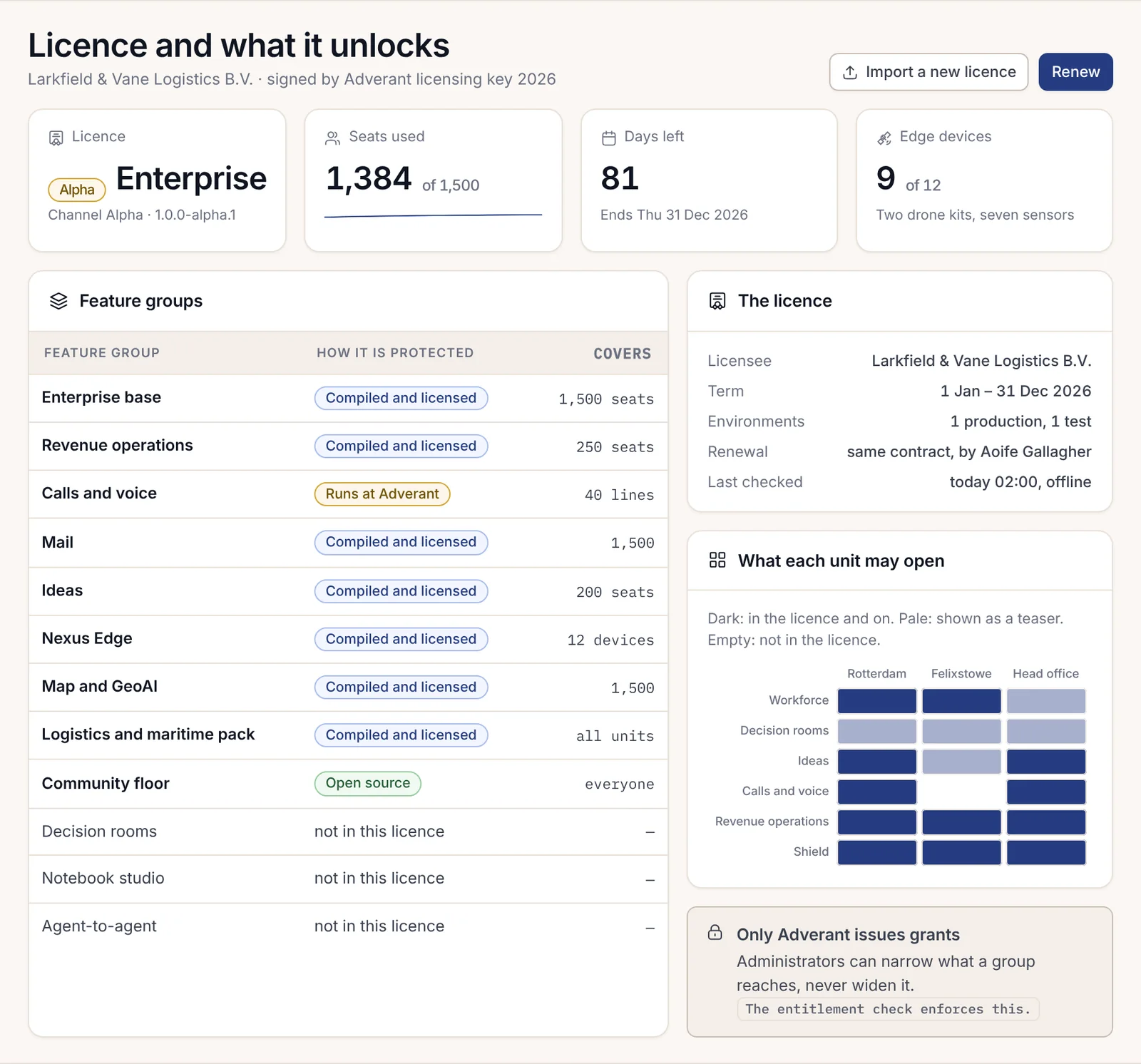
A licence is a signed document. It names the licensee and the term. It also lists every feature group it covers, with what each group counts: seats for most, and devices or phone lines for a few. Adverant signs every licence with two independent keys.
The important part for a business is where it's checked. Your installation checks the licence itself, offline, against keys built into its own signed software. There's no call to Adverant, so the same licence works on a site with no internet. A licence file that has been altered, or wasn't signed by Adverant, counts as absent. The Licence page says so, and nothing the file claims is switched on. Each licensed module is also checked against Adverant's signature before it runs, so a changed copy is never loaded.
How the licence arrives depends on how you run Nexus. On Adverant's cloud there's nothing to import. A connected installation fetches its licence from your Adverant account. An air-gapped one exchanges signed files carried by a person, as Harrow does. A licence file made that way works only on the installation that asked for it.
You can try Enterprise first. On Adverant's cloud, a 14-day trial needs no card. On your own infrastructure, an evaluation licence runs for 30 days for five people named before it starts. Neither turns into a paid plan by itself. When an evaluation ends, its features return to teasers and everything made during it is kept, ready to open again the moment a licence is imported.
If more people join than the licence covers, perhaps because a directory sync brought in a batch of contractors, nobody is locked out. The page explains where they came from and gives 30 days to remove people or add seats.
What the licence states mean
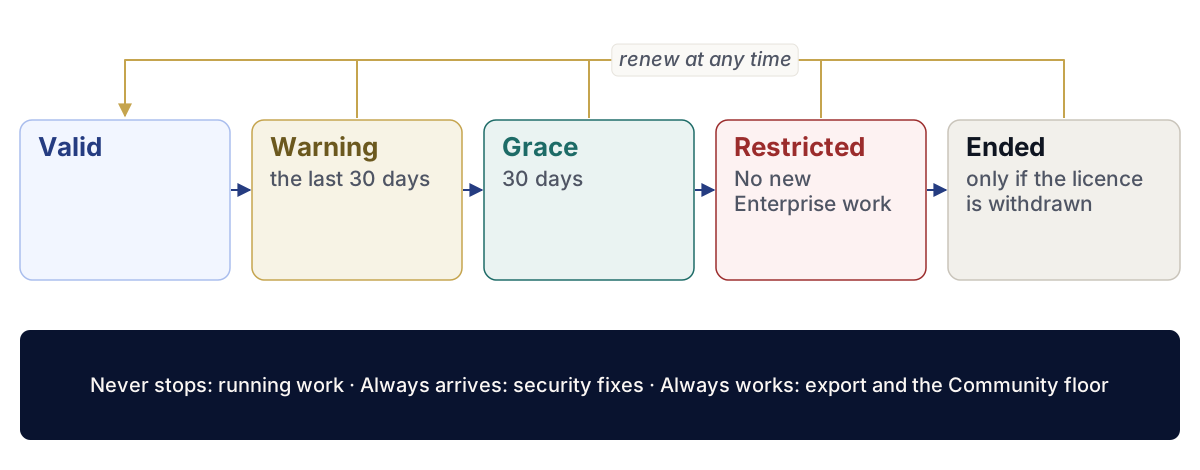
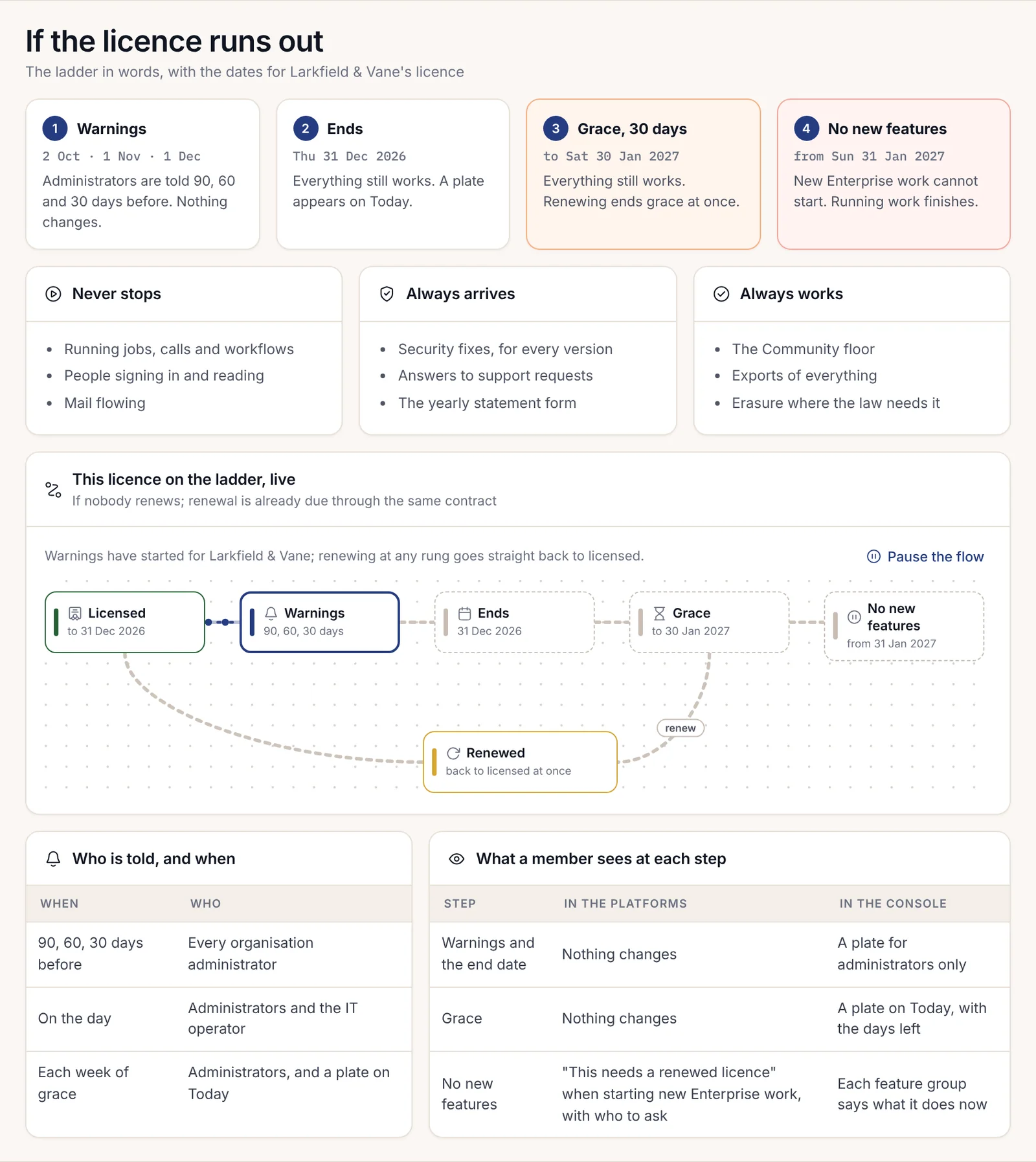
A licence moves through a short ladder of states. The ladder is written out in words, with your dates, on the "If the licence runs out" page, so nobody has to guess.
| State | What you see | What still happens |
|---|---|---|
| Valid | Everything the licence lists is on | Everything |
| Warning | From 30 days before the end, unless the contract sets another number, administrators are told in the product as well as by email | Everything; nothing changes |
| Grace | After the end date, a plate on Today counts down 30 days | Everything still works, and renewing ends grace at once |
| Restricted | Starting new Enterprise work says it needs a renewed licence, and who to ask. A licence that simply runs out stays here until it's renewed | Running work finishes, reads and exports keep working, and security fixes still arrive |
| Ended | Only if Adverant withdraws the licence: Enterprise parts stop being offered | The Community floor and every export keep working, and sealed records stay readable |
An evaluation licence has no grace period, which is the one exception. Renewing at any rung goes straight back to Valid.
The promises every licence keeps
Whatever state a licence is in, four things hold. Nothing running is stopped by a licence: a job started before grace ended runs to its end. Export always works in every edition and every state, because your data is yours. Security fixes always arrive for every version, whether or not you've renewed. Sealed records stay readable, so the evidence you've built is never held back.
Buyers sometimes ask, at the end of a meeting, what happens if Adverant disappears. The answer is on the same page. Running work never stops. The Community floor and every export keep working, and the source of the compiled parts is held in escrow under the contract.
From Community to Enterprise, in place
Many organisations start on Community and move up once the work is proven. The move happens on the same installation. Nothing is reinstalled and nothing is migrated.
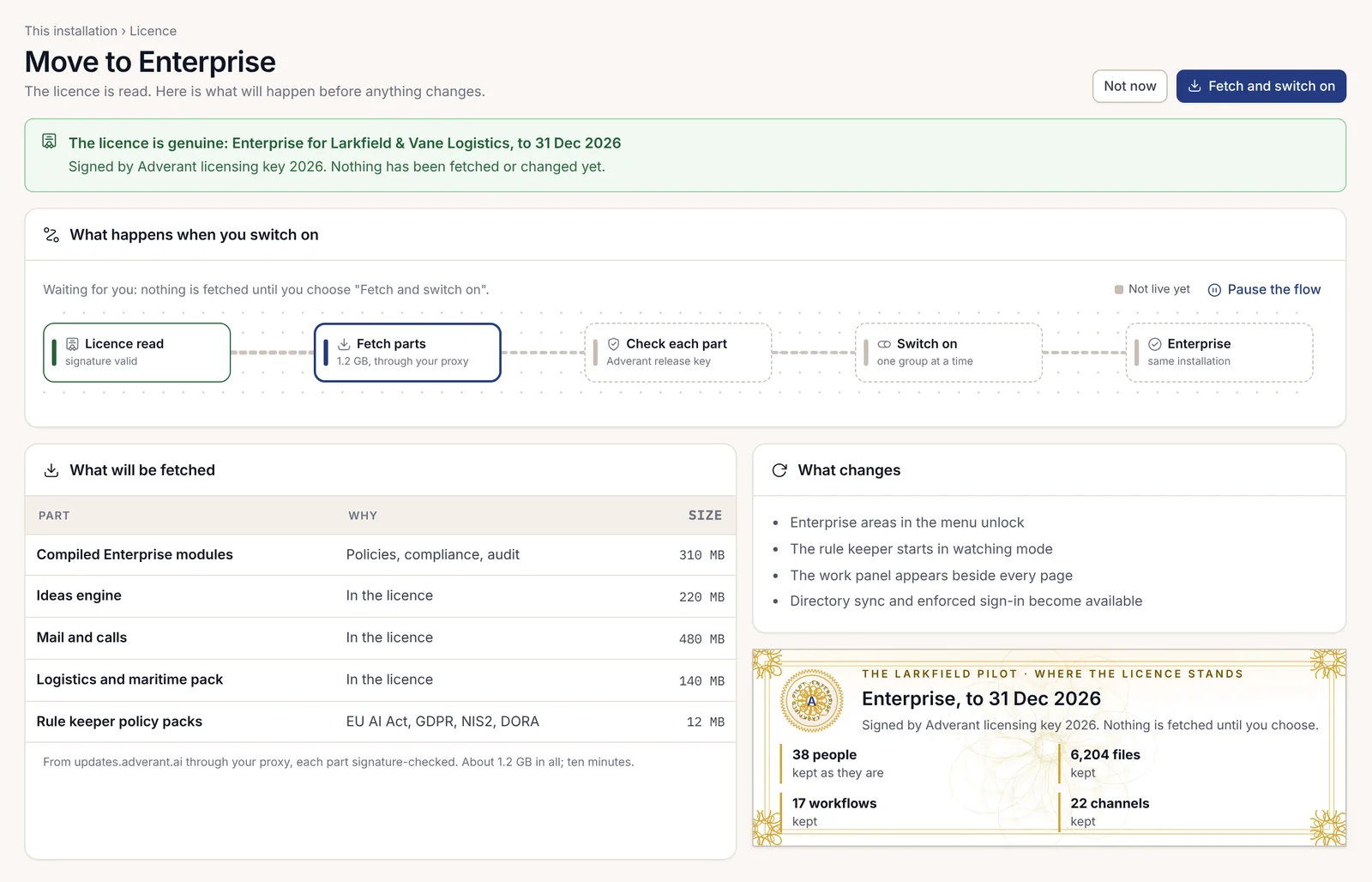
An administrator imports the Enterprise licence on the Licence page. Nexus first checks the licence and shows what it would fetch, before anything changes: the compiled Enterprise parts and any add-ons or packs the licence includes, each checked against Adverant's signature. It also lists what will change, such as the work panel appearing and enforced company sign-in becoming available. Nothing is fetched until the administrator chooses "Fetch and switch on". Then the feature groups switch on one at a time. People and their files stay exactly as they were, and so do workflows and channels. On an air-gapped site the parts arrive on signed media instead of over the network.